3D & 4D Adjustable Armrests: Prevent Pain & Boost Comfort
High-quality office chairs with 4d adjustable armrests are a key tool for preventing the shoulder and neck pain many office workers experience. This level of customisation provides more than a simple place to rest your arms. It is an adaptive support that fits your body and work, from intensive typing to meetings. Well-designed ergonomic office chairs incorporate these features to provide comprehensive support.
Knowing how these armrests function helps create a workspace that supports your health. Our online office chair shop features a variety of models with these advanced features.
The Difference Between 3D and 4D Armrest Adjustments
The primary difference between 3D and 4D armrests is one specific movement. This single adjustment significantly affects daily comfort for different body types.
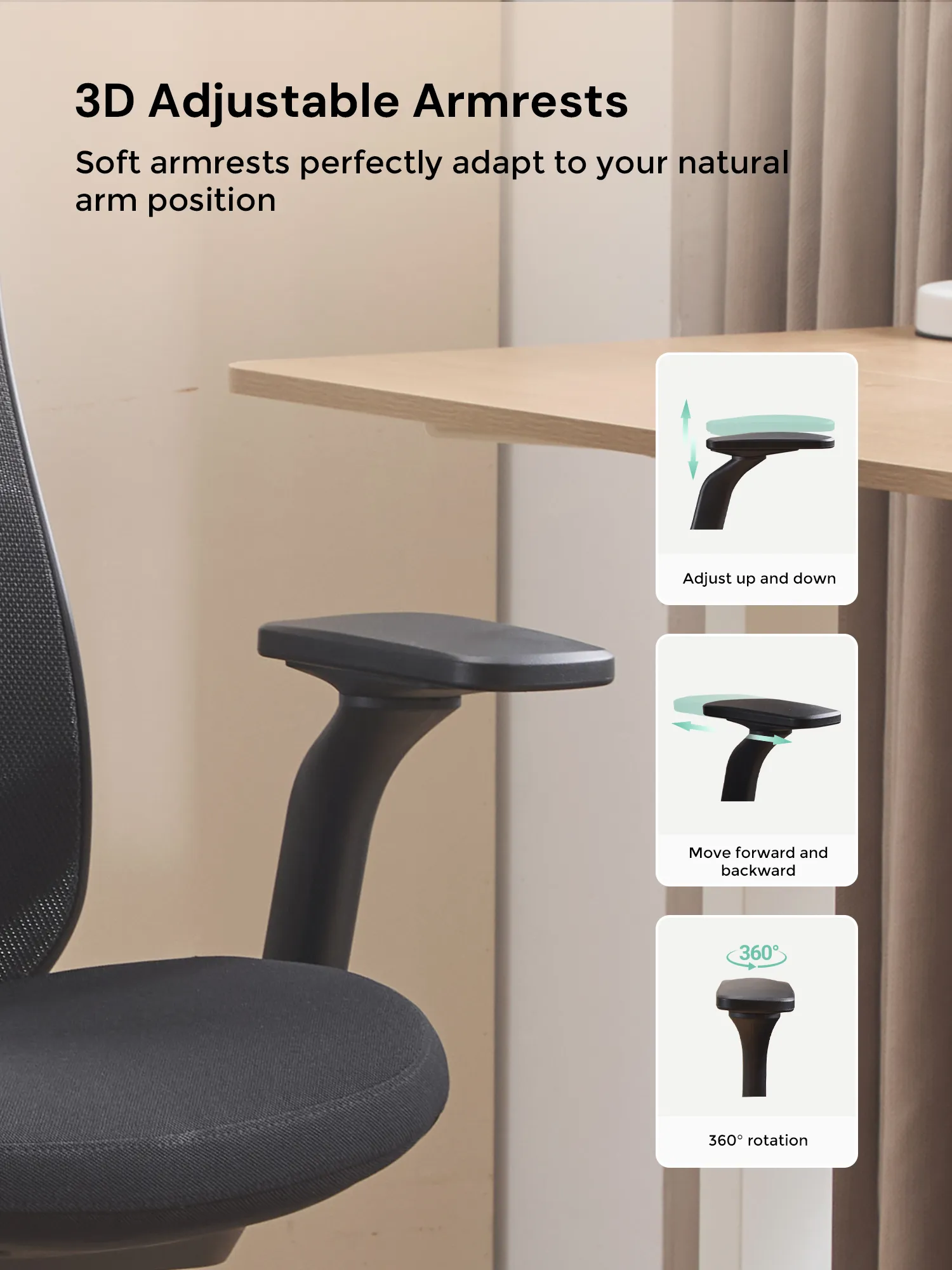
The Three Adjustments of a 3D Armrest
A 3D armrest provides three core adjustments. These controls ensure your arms are supported, which reduces strain on your shoulders.
- Height Adjustment (Up/Down): This allows you to set the armrest level with your elbow when your shoulders are relaxed, preventing shrugging.
- Position Adjustment (Forward/Back): Slide the armrest pad forward for typing support or back to clear space when you need to move.
- Pivot Adjustment (In/Out): Angle the armrests inwards to support your forearms when using a keyboard or outwards for more relaxed postures.
The Fourth Dimension: 4D Armrest Width Adjustment
The 4d adjustable armrests include all the movements of a 3D model and add a fourth adjustment: width. This feature is highly effective for accommodating different body frames, from narrow to broad-shouldered individuals.
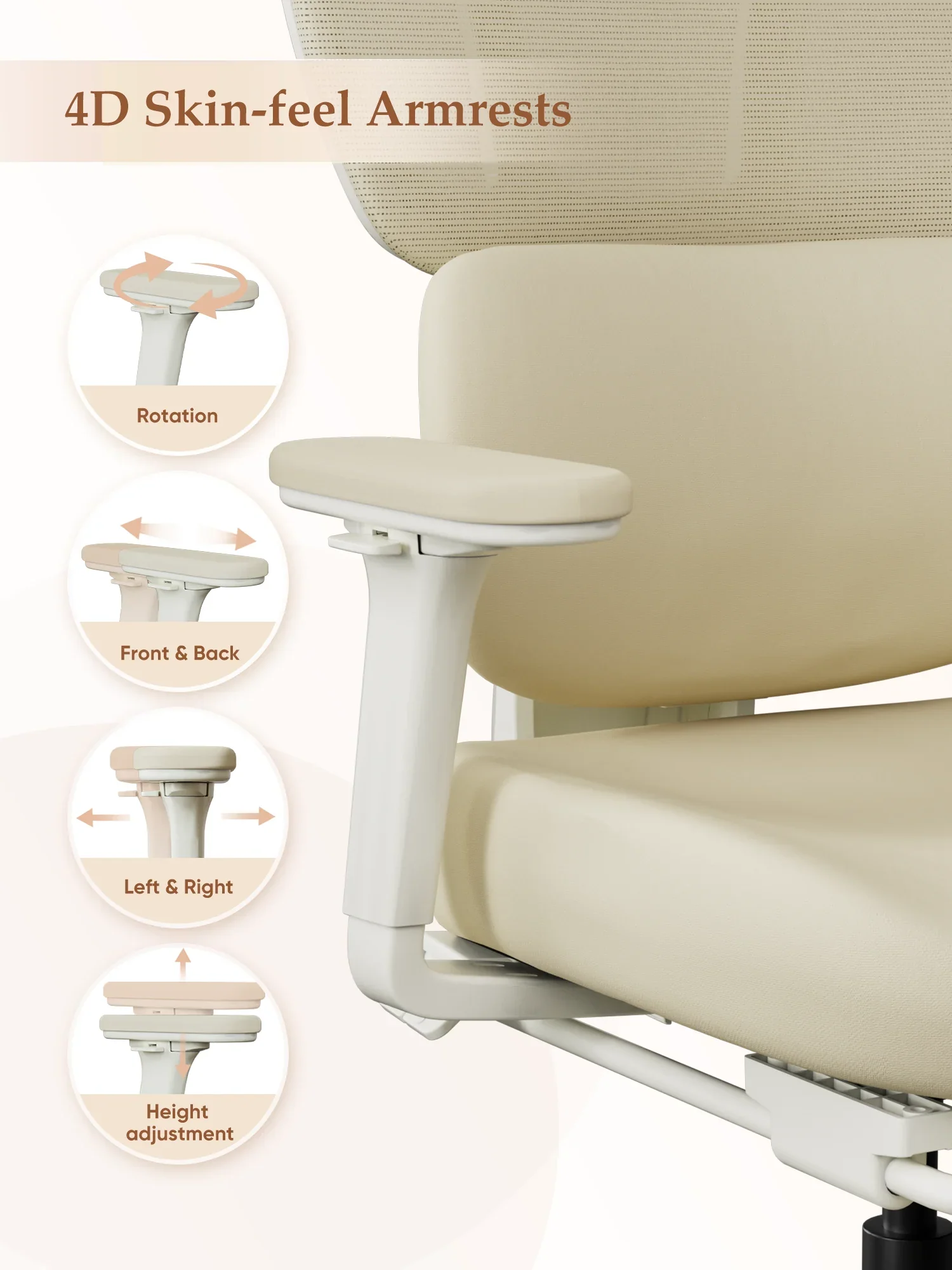
| Feature | 3D Armrest | 4D Armrest | Primary Ergonomic Benefit |
|---|---|---|---|
| Height (Up/Down) | ✔ | ✔ | Prevents shoulder shrugging. |
| Position (Forward/Back) | ✔ | ✔ | Supports arms during different tasks. |
| Pivot (Angle In/Out) | ✔ | ✔ | Aligns with forearm angle for typing. |
| Width (In/Out) | ❌ | ✔ | Accommodates different shoulder widths. |
How Adjustable Armrests Prevent Shoulder and Neck Pain
The persistent ache in your shoulders often starts with unsupported arms. When your elbows hang without support, your trapezius muscles, which connect your neck and shoulders, are constantly engaged to hold them up. This leads to fatigue, stiffness, and pain.
Properly adjusted armrests take this load off. By setting the height so your elbows rest lightly at a 90-degree angle, you allow your shoulders to drop into a relaxed, natural position. You can physically feel the tension release the moment your arms are correctly supported.
The Role of Armrests in Posture and Back Support
Arm support directly impacts your overall posture. Unsupported arms tend to pull the shoulders forward, causing your upper back to round and your head to push forward. This "text neck" posture places immense strain on your cervical spine.
Using 3D or 4D armrests to support your forearms creates a stable base for your upper body. This makes it easier to keep your shoulders back and maintain the natural S-curve of your spine, significantly reducing lower back strain. This is a common issue addressed by specialized orthopedic chairs.
Desk Compatibility and Workspace Integration
A chair with fixed or poorly adjustable armrests presents a critical ergonomic flaw. The armrests frequently collide with the edge of the desk, preventing you from pulling your chair close enough to your work. This forces you to lean forward, putting your entire spine in a compromised and painful position.
With 4d adjustable armrests, this problem is solved. You can lower them, slide them back, or adjust their width to fit under the desk. This allows you to sit with your back against the chair's backrest while staying close to your keyboard and monitor, a key feature in quality executive office chairs that promotes a correct, upright posture.
Choosing Between 3D and 4D Armrests for Different Users
The choice between 3D and 4D armrests depends on the user and the work environment. A dedicated single user with an average build will find that 3D armrests often provide sufficient support. They offer the core adjustments needed for daily comfort in various task chairs.
In contrast, 4D armrests are essential for hot-desking environments or for individuals with broader or narrower shoulders. The ability to adjust the width ensures that the armrests are positioned directly under the elbows, not too far out or too close in, providing personalised support.
Long-Term Health and Productivity Benefits of Proper Arm Support
Investing in a chair with highly adjustable armrests contributes to long-term health. Consistent, proper support helps prevent chronic conditions like Repetitive Strain Injury (RSI), carpal tunnel syndrome, and chronic upper back pain.
For a business, this translates directly into productivity. A comfortable worker is a focused worker. Reducing physical discomfort leads to higher concentration, fewer unscheduled breaks, and a lower rate of absenteeism related to musculoskeletal issues.
The Business Case for Advanced Armrest Technology
The incremental cost for a chair with 4D armrests is minimal compared to the long-term costs of poor ergonomics. A single case of a work-related musculoskeletal disorder can cost a company significantly in lost productivity and potential medical expenses.
Providing employees with equipment that prevents injury is a proactive strategy. It demonstrates a commitment to staff well-being, which improves morale and retention while boosting operational efficiency. For more expert advice on workplace ergonomics, visit our office chair blog.
Why 4D Armrests Suit Nairobi's Hybrid Work Model
In Nairobi's evolving work culture, hybrid and remote models have made the home office a critical workspace. A single chair may be used for long hours of focused work, video calls, and other tasks, requiring suitable home office chairs. This multi-use scenario makes adjustability paramount.
A chair with 4d adjustable armrests provides the versatility needed to support these different activities and postures throughout the day. This level of customisation ensures that professionals in Nairobi can maintain their health and productivity, no matter where their office is located.
Conclusion: The Value of 4D Armrests for a Productive Workspace
Switching from a fixed-arm chair to one with 4D adjustability significantly improves daily comfort. The chair conforms to your body, rather than forcing your body to conform to the chair.
This feature is one of the most effective tools for preventing common workplace aches and pains. Correct arm support leads to a more comfortable, focused, and productive way of working. Browse our product categories to find a chair with the right armrest adjustments for your needs.
A Step-by-Step Guide to Setting Up Your 4D Armrests
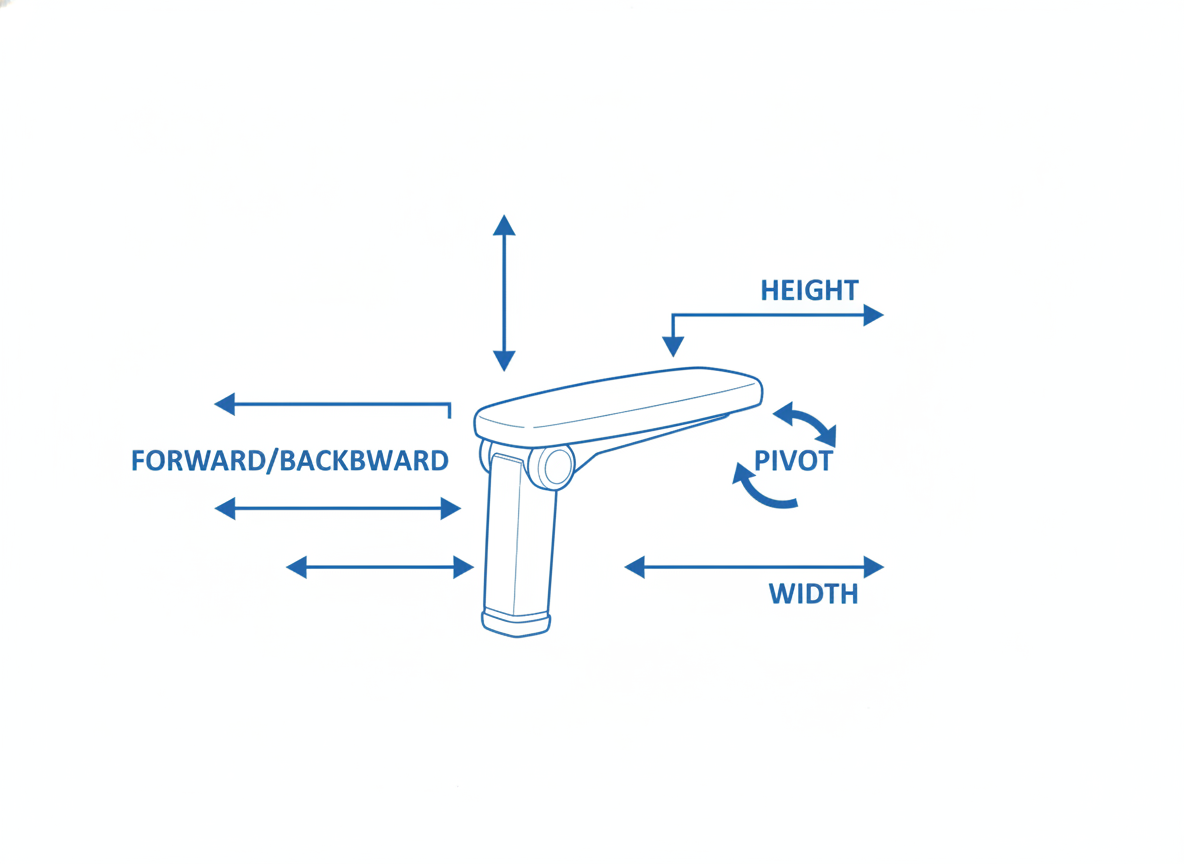
Once you have a chair with advanced armrests, correct setup is key to receiving their full benefits. Follow these simple steps to find your perfect fit.
- Step 1: Set Your Chair Height. First, adjust your main seat height so your feet are flat on the floor and your knees are at a roughly 90-degree angle.
- Step 2: Relax Your Shoulders. Sit back in your chair and let your shoulders drop completely. Do not shrug or hold them up. Let your arms hang loosely at your sides.
- Step 3: Adjust Armrest Height. Raise or lower the armrests until the pads just make contact with your elbows. Your elbows should form a 90-degree angle, and you should not feel your shoulders being pushed up.
- Step 4: Adjust Armrest Width. Slide the armrests inwards or outwards so they sit directly beneath your elbows. Your arms should not have to angle outwards or be squeezed inwards to use them.
- Step 5: Adjust Position and Pivot. For typing, slide the pads forward and pivot them slightly inwards to support your forearms. When using a mouse, you might prefer one armrest slightly further back. Adjust as your tasks change throughout the day.
Need Office Chairs?
Browse our collection of office chairs at competitive prices. Fast delivery anywhere in Kenya.